
Looking for a simple, customizable web interface for your Azure OpenAI models? I’ve developed a free, lightweight .NET 9 Chat GUI that you can download and modify. Built with .NET 9, it offers a straightforward way to interact with your models directly from your own environment.
Key Features:
- Free & Customizable: Download the zipped project and tweak it to your heart’s content.
- .NET 9 Powered: Built using the latest .NET framework for modern performance and features.
- Easy Configuration: Simply add your Azure OpenAI model details to the appsettings.json file. The first model listed in the collection will be the default.
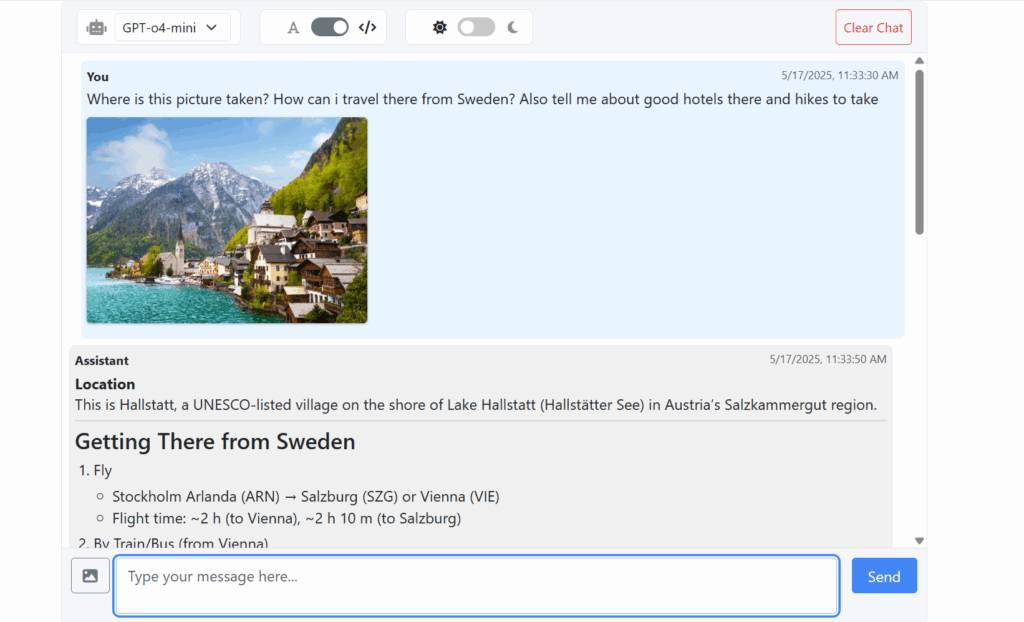
- Versatile Input: Supports both text and image input. The text input area dynamically expands as you add more lines.
- User-Friendly Interface:
- Convenient model selector to switch between your configured models.
- Toggles to display answers as formatted Markdown or plain text.
- Switch between light and dark mode for comfortable viewing.
- Easily copy generated answers to your clipboard.
- A “Clear Chat” button to reset the conversation.
- Solid Tech Stack: An MVC web application that uses Bootstrap, Font Awesome, and jQuery for the frontend, and .NET 9 with the Azure.AI.OpenAI SDK NuGet package for the backend.
- Secure: Windows authentication is activated by default in program.cs.
Here’s a glimpse of the chat in action, showcasing image input and a formatted response:
Get Started
- Download: You can download the zipped project here.
- Use It:
- Add your models to appsettings.json.
- Run the project (e.g., using dotnet run in your terminal).
- Alternatively, build, publish, and host it on a server with the .NET 9 Hosting Bundle installed. Personally, I work with it in VS Code.
It will probably only require minimal changes to work with OpenAI’s own API, as Azure’s SDK has adopted similar structures. However, this is not something I have tested.
Background
I have been using OpenAI models in Azure for over a year. I initially started with the Azure example app as a GUI but wanted more customization options and a .NET-based solution.
My workplace has recently started blocking access to ChatGPT and Google AI Studio. However, calling an OpenAI model in Azure via REST is not blocked, and likely won’t be. Therefore, running this lightweight GUI locally works perfectly for my needs. I also have a monthly allocation of Azure credits, so it doesn’t cost me anything to run.
Alternatives
- I have used the Azure OpenAI Python sample app, and while it worked okay for text input, it didn’t support image input, and I have requirements that lead me to prefer a .NET solution. It also lacked a model selector. You can find it here: https://learn.microsoft.com/en-us/azure/ai-services/openai/how-to/use-web-app
- Open WebUI works fine and has a simple setup, if you want and can run it in a Docker container. Check it out here: https://github.com/open-webui/open-webui